- Load the R package we will use.
- Quiz questions
Replace all the ???s. These are answers on your moodle quiz.
Run all the individual code chunks to make sure the answers in this file correspond with your quiz answers
After you check all your code chunks run then you can knit it. It won’t knit until the ??? are replaced
The quiz assumes that you have watched the videos, downloaded (to your examples folder) and worked through the exercises in exercises_slides-50-61.Rmd
- Pick one of your plots to save as your preview plot. Use the ggsave command at the end of the chunk of the plot that you want to preview.
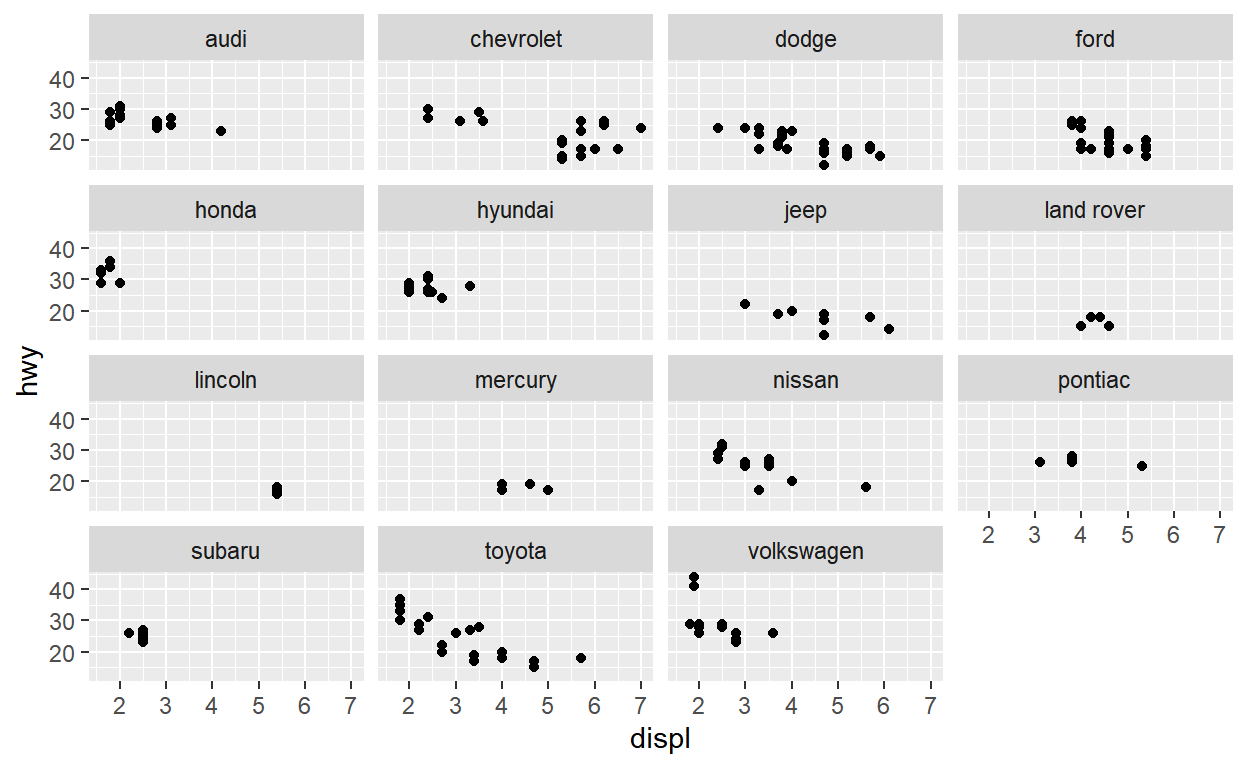
Question: modify slide 51
- Create a plot with the
mpgdataset - add points with
geom_point - assign the variable
displto the x-axis - assign the variable
hwyto the y-axis - add
facet_wrapto split the data into panels based on themanufacturer
ggplot(data = mpg) +
   geom_point(aes(x = displ, y = hwy)) +
   facet_wrap(facets = vars(manufacturer))
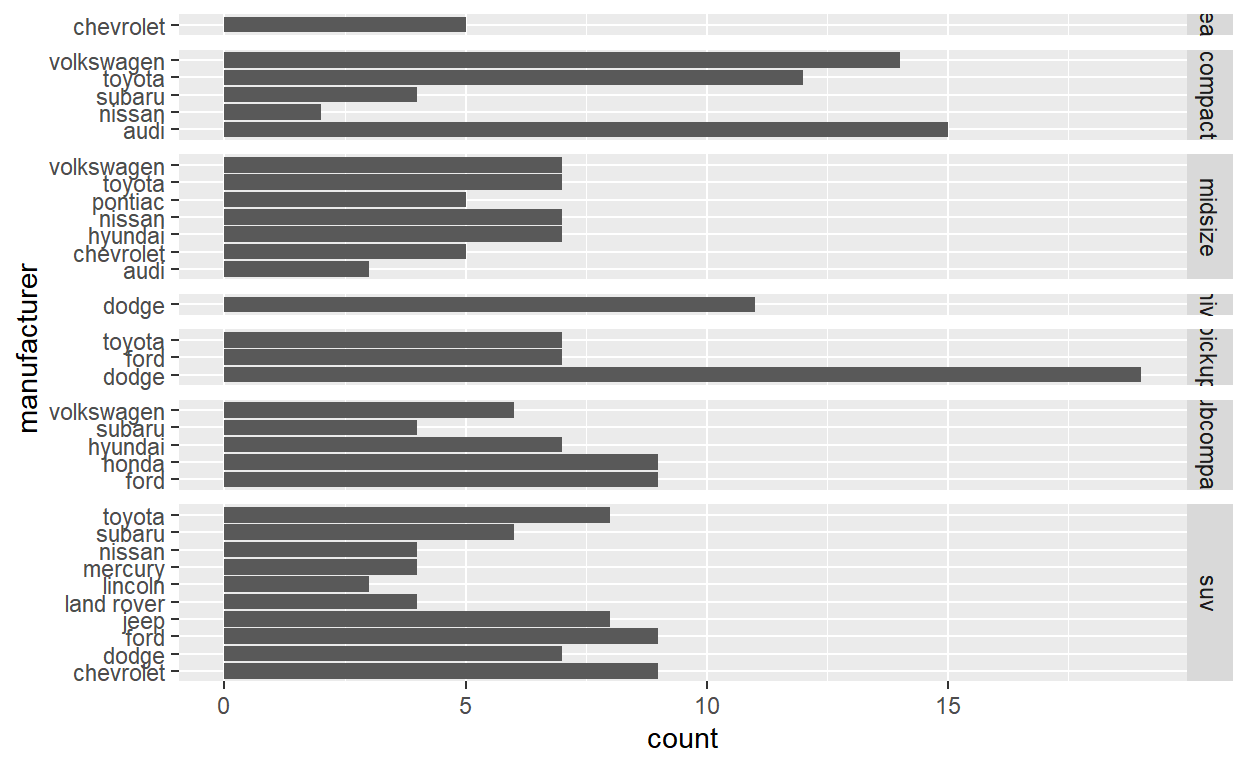
Question: modify facet-ex-2
- Create a plot with the
mpgdataset - add bars with with
geom_bar - assign the variable
manufacturerto the y-axis - add
facet_gridto split the data into panels based on theclass - let scales vary across columns
- let space taken up by panels vary by columns
ggplot(mpg) +
  geom_bar(aes(y = manufacturer)) +
  facet_grid(vars(class), scales = "free_y", space = "free_y")
Question: spend_time
To help you complete this question use:
the patchwork slides and
the vignette: https://patchwork.data-imaginist.com/articles/patchwork.html Download the file
spend_time.csvfrom moodle into directory for this post. Or read it in directly:read_csv(“https://estanny.com/static/week7/drug_cos.csv”)
spend_timecontains 10 years of data on how many hours Americans spend each day on 5 activities
read it into spend_time
spend_time <- read_csv("spend_time.csv")
Start with spend_time
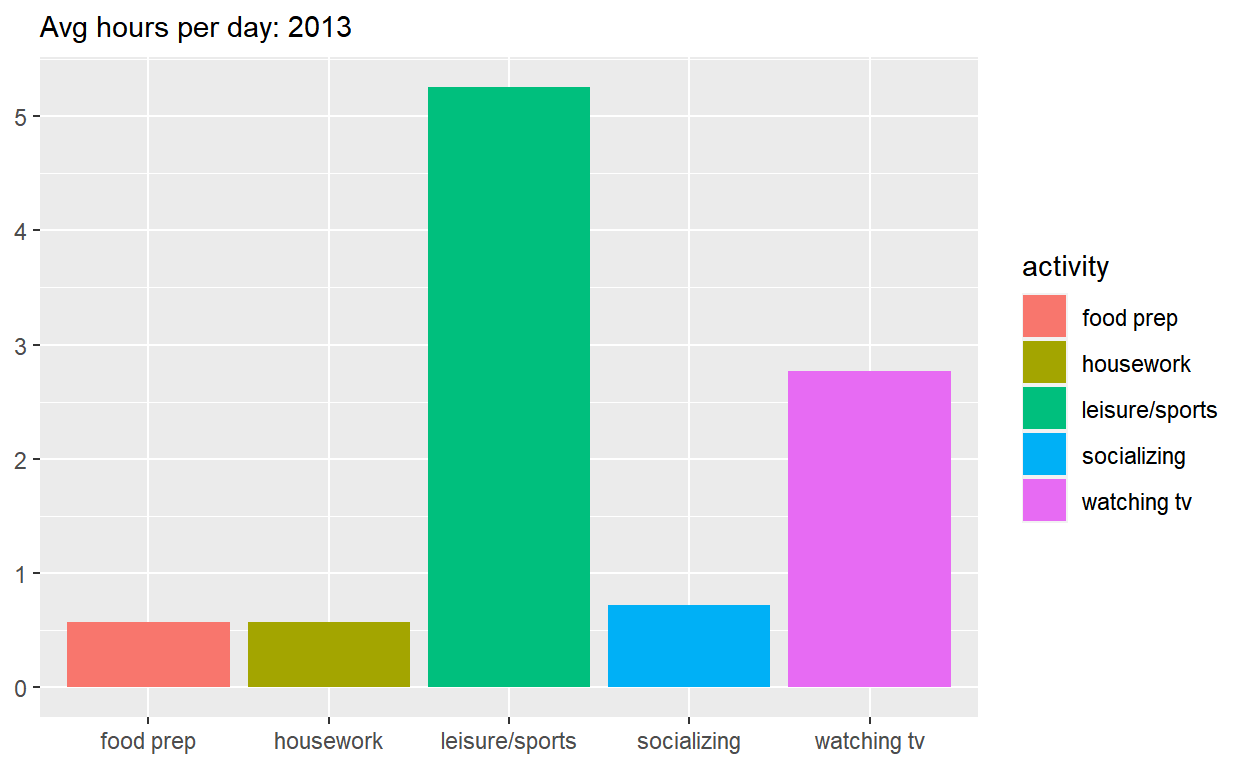
extract observations for 2013
THEN create a plot with that data
ADD a barchart with with
geom_colassign
activityto the x-axisassign
avg_hoursto the y-axisassign
activityto fillADD
scale_y_continuouswith breaks every hour from 0 to 6 hoursADD
labstoset
subtitleto Avg hours per day: 2013set
xandyto NULL so they won’t be labeledassign the output to
p1display
p1
p1  <- spend_time %>% filter(year == "2013")  %>%
ggplot() +
  geom_col(aes(x = activity, y = avg_hours, fill = activity)) +
  scale_y_continuous(breaks = seq(0, 6, by = 1)) +
  labs(subtitle = "Avg hours per day: 2013", x = NULL, y = NULL)

p1
Start with spend_time
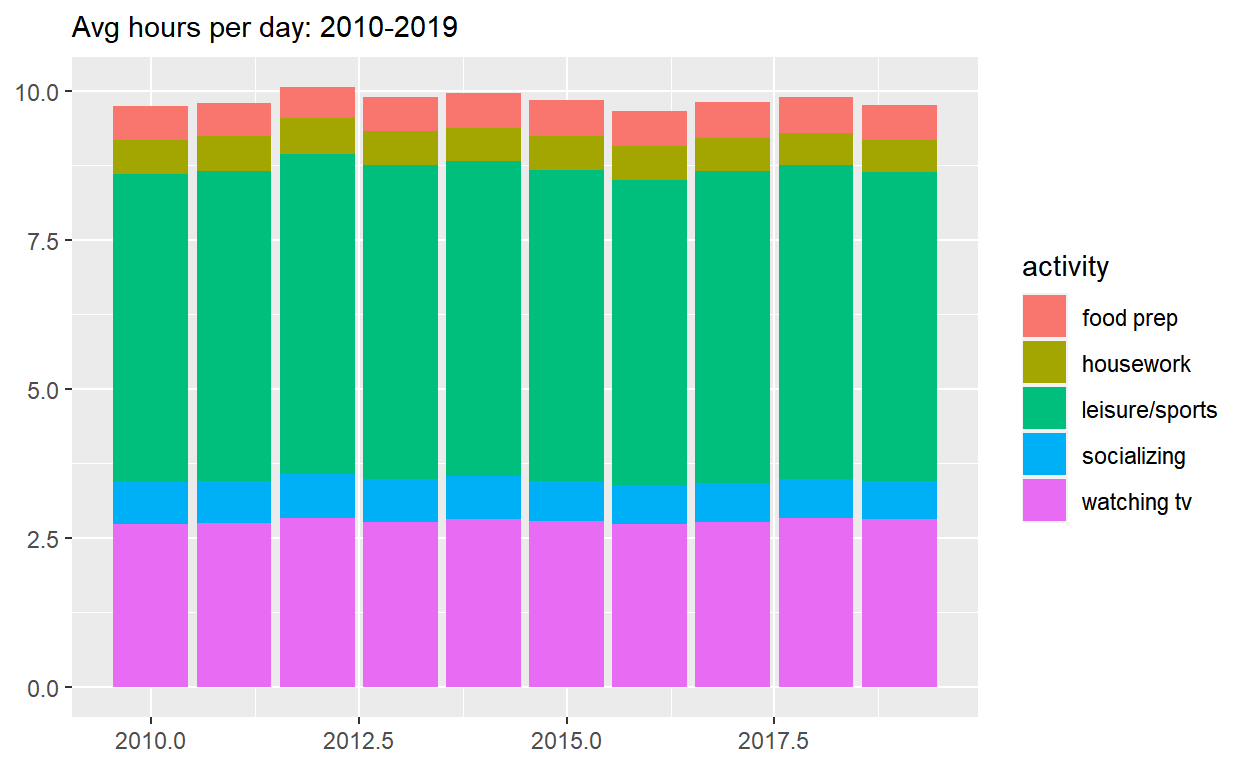
- THEN create a plot with it
- ADD a barchart with with geom_col
- assign year to the x-axis
- assign avg_hours to the y-axis
- assign activity to fill
- ADD labs to
- set subtitle to “Avg hours per day: 2010-2019”
- set x and y to NULL so they won’t be labeled
- assign the output to p2
- display p2
p2  <- spend_time  %>%
ggplot() +
  geom_col(aes(x = year, y = avg_hours, fill = activity)) +
  labs(subtitle  = "Avg hours per day: 2010-2019", x = NULL, y = NULL)

p2
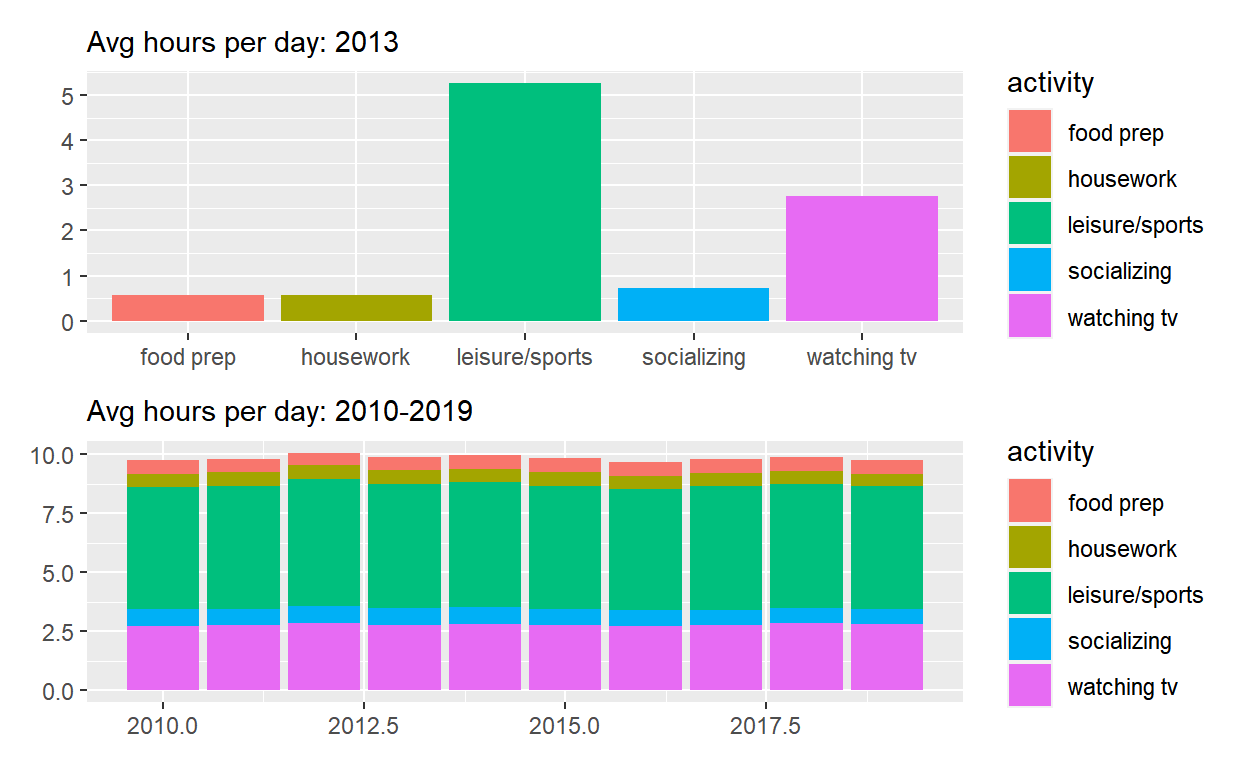
Use patchwork to display p1 on top of p2
- assign the output to
p_all - display
p_all
p_all  <-  p1 / p2

p_all
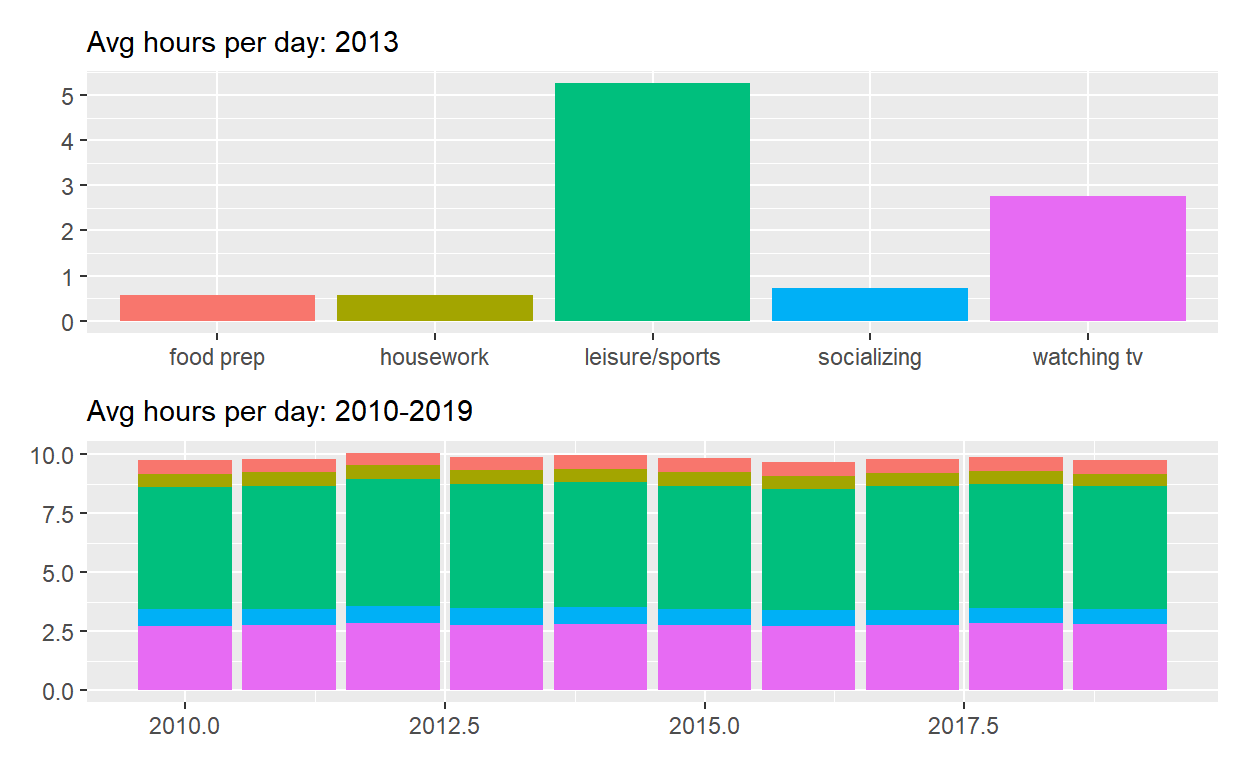
Start with p_all
- AND set
legend.positionto ‘none’ to get rid of the legend - assign the output to
p_all_no_legend - display
p_all_no_legend
p_all_no_legend  <- p_all & theme(legend.position = 'none')
p_all_no_legend
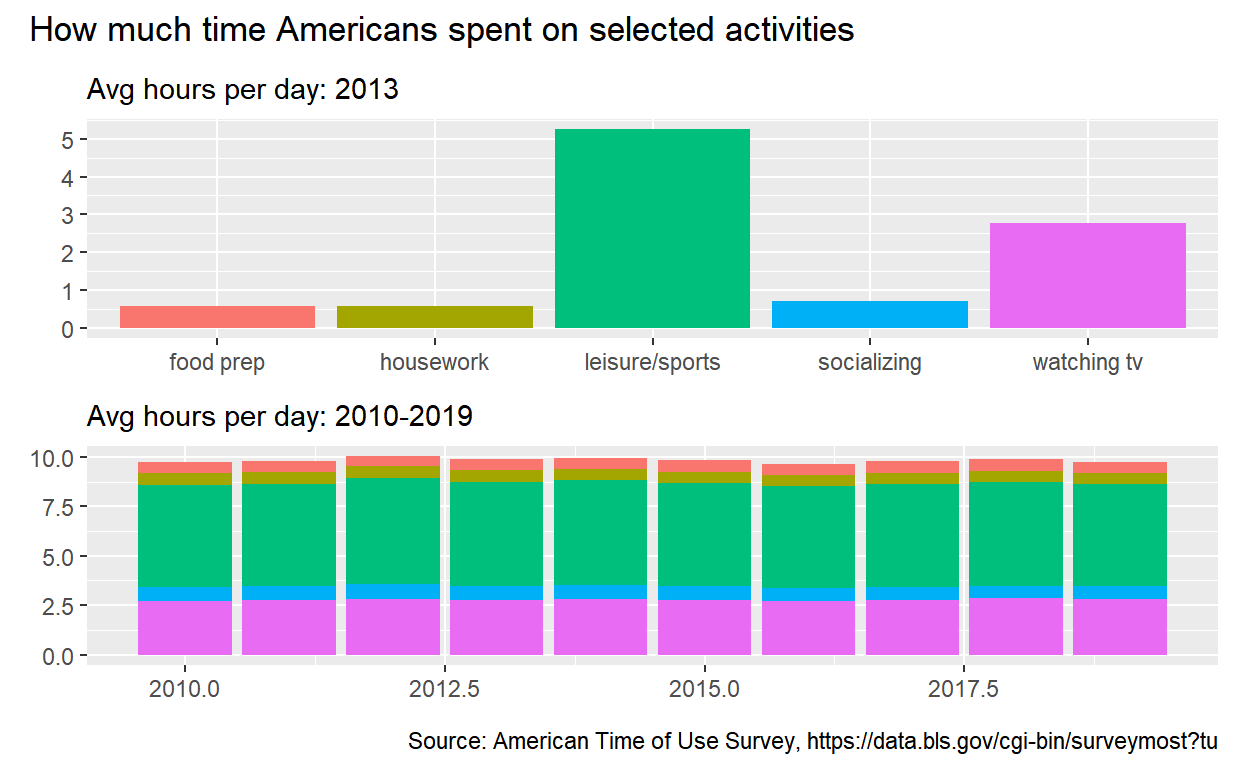
Start with p_all_no_legend
- see how annotate the composition here: https://patchwork.data-imaginist.com/reference/plot_annotation.html
- ADD
plot_annotationset titleto “How much time Americans spent on selected activities”captionto “Source: American Time of Use Survey, https://data.bls.gov/cgi-bin/surveymost?tu”
p_all_no_legend  +
 plot_annotation(title = "How much time Americans spent on selected activities",
                  caption = "Source: American Time of Use Survey, https://data.bls.gov/cgi-bin/surveymost?tu")
Question: Patchwork 2
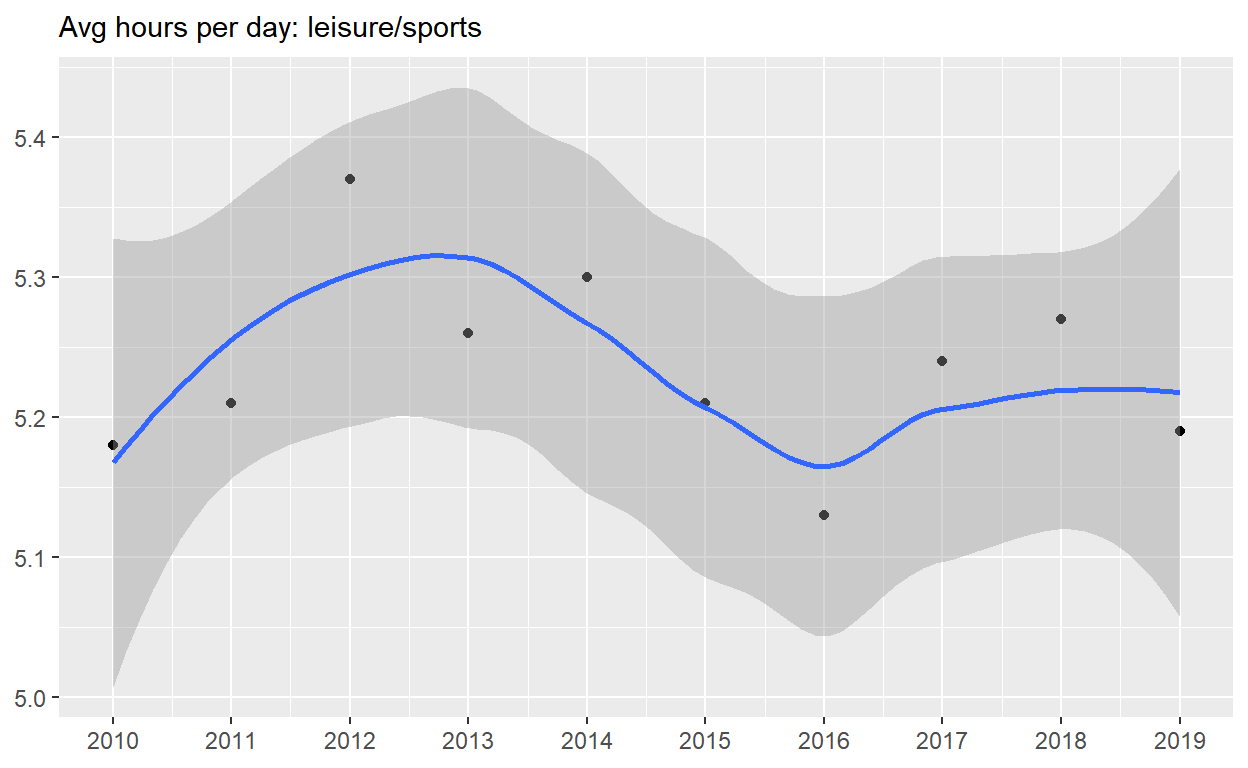
use spend_time from last question patchwork slides
Start with spend_time
- extract observations for leisure/sports
- THEN create a plot with that data
- ADD points with
geom_point - assign
yearto the x-axis - assign
avg_hoursto the y-axis - ADD line with
geom_smooth - assign
yearto the x-axis - assign
avg_hoursto the y-axis - ADD breaks on for every year on x axis with with
scale_x_continuous - ADD
labsto - set subtitle to Avg hours per day: leisure/sports
- set
xandyto NULL so x and y axes won’t be labeled - assign the output to
p4 - display
p4
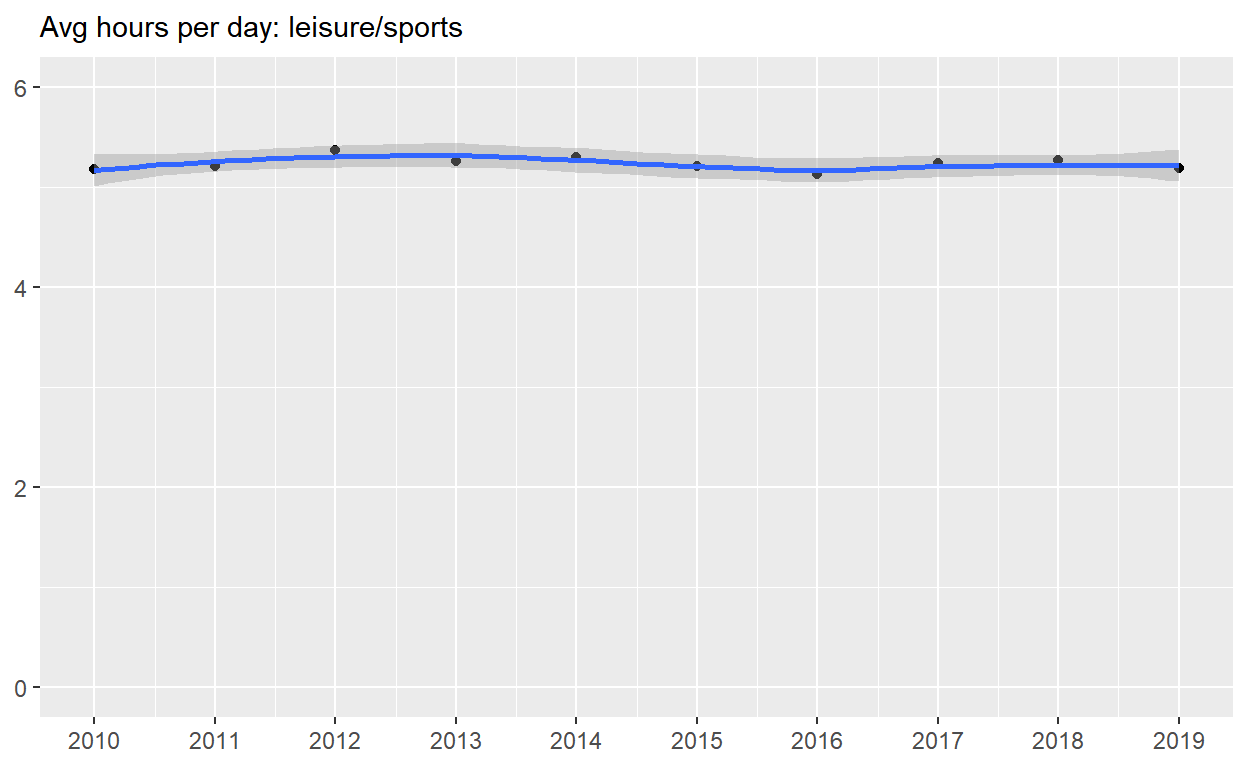
p4  <-
spend_time %>% filter(activity == "leisure/sports")  %>%
ggplot() +
  geom_point(aes(x = year, y = avg_hours)) +
  geom_smooth(aes(x = year, y = avg_hours)) +
  scale_x_continuous(breaks = seq(2010, 2019, by = 1)) +
  labs(subtitle = "Avg hours per day: leisure/sports", x = NULL, y = NULL)

p4
Start with p4
- ADD
coord_cartesianto change range on y axis to 0 to 6 - assign the output to
p5 - display
p5
p5 <-  p4 + coord_cartesian(ylim = c(0, 6))
p5
Start with spend_time
- create a plot with that data
- ADD points with
geom_point - assign
yearto the x-axis - assign
avg_hoursto the y-axis - assign
activityto color - assign
activityto group - ADD line with
geom_smooth - assign
yearto the x-axis - assign
avg_hoursto the y-axis - assign
activityto color - assign
activityto group - ADD breaks on for every year on x axis with with
scale_x_continuous - ADD
coord_cartesianto change range on y axis to 0 to 6 - ADD
labsto - set
xandyto NULL so they won’t be labeled - assign the output to
p6 - display
p6
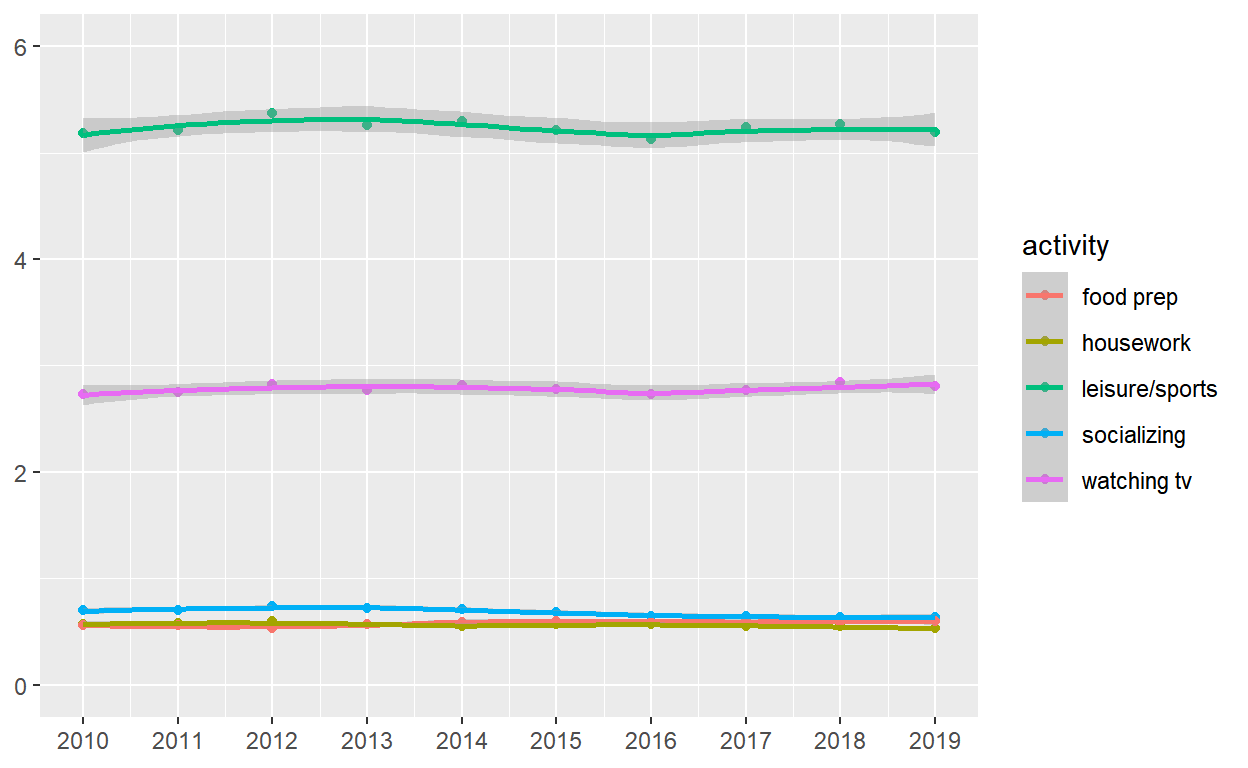
p6   <-
 spend_time  %>%
ggplot() +
  geom_point(aes(x = year, y = avg_hours, color = activity, group = activity)) +
  geom_smooth(aes(x = year, y = avg_hours, color = activity, group = activity)) +
  scale_x_continuous(breaks = seq(2010, 2019, by = 1)) +
  coord_cartesian(ylim = c(0, 6)) +
  labs(x = NULL, y = NULL)

p6
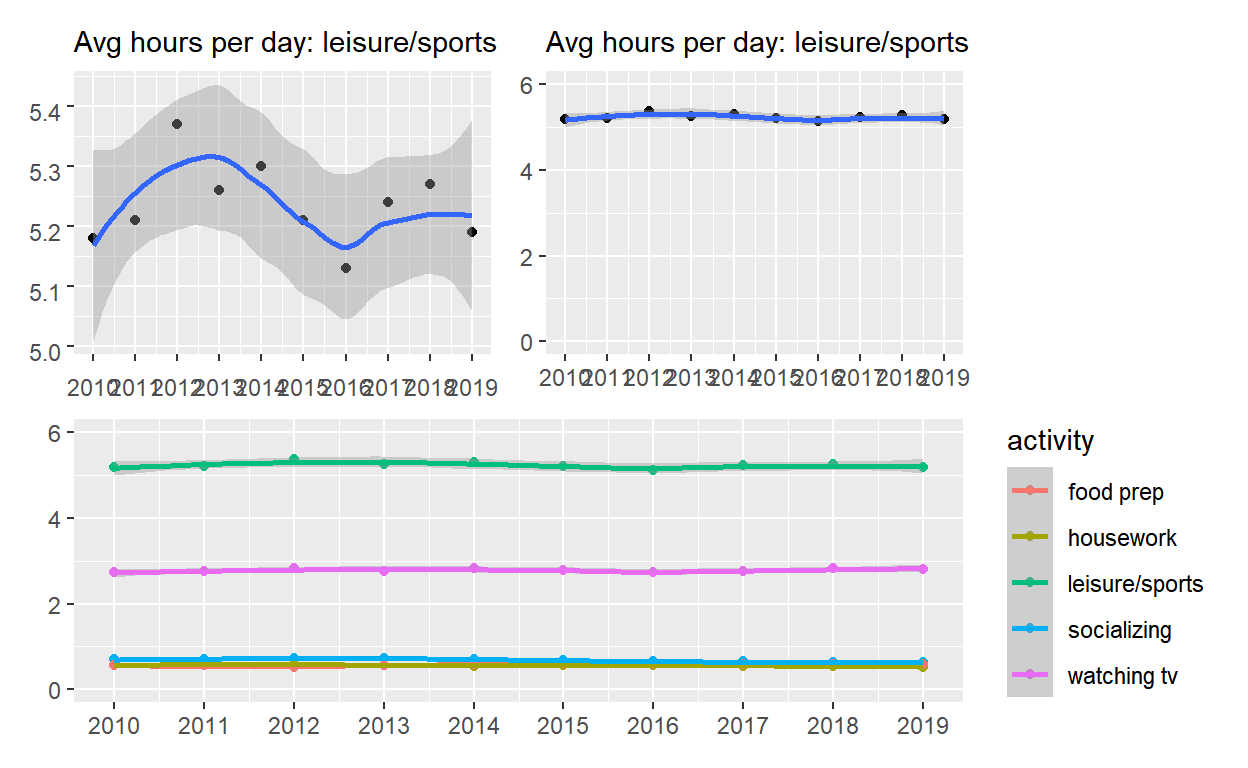
Use patchwork to display p4 and p5 on top of p6
( p4 | p5 ) / p6
ggsave(filename = "preview.png",
       path = here::here("_posts", "2021-03-08-exploratory-analysis-ii"))